New · hands-free with Siri

Tibber spot prices on Apple Watch, iPhone, Mac & iPad.

The unofficial Tibber app for your whole Apple universe. Live consumption and cheapest hours — as complication, Live Activity, lock-screen widget, in your menu bar on a wall display — or just ask Siri, completely hands-free.

Get Early Access How it works
watchOS 10 · iOS 17 · iPadOS 17 · macOS 14 No ads · no trackers Direct Tibber-API connection
iPhone

Live Activity, Lock Screen, Dynamic Island.

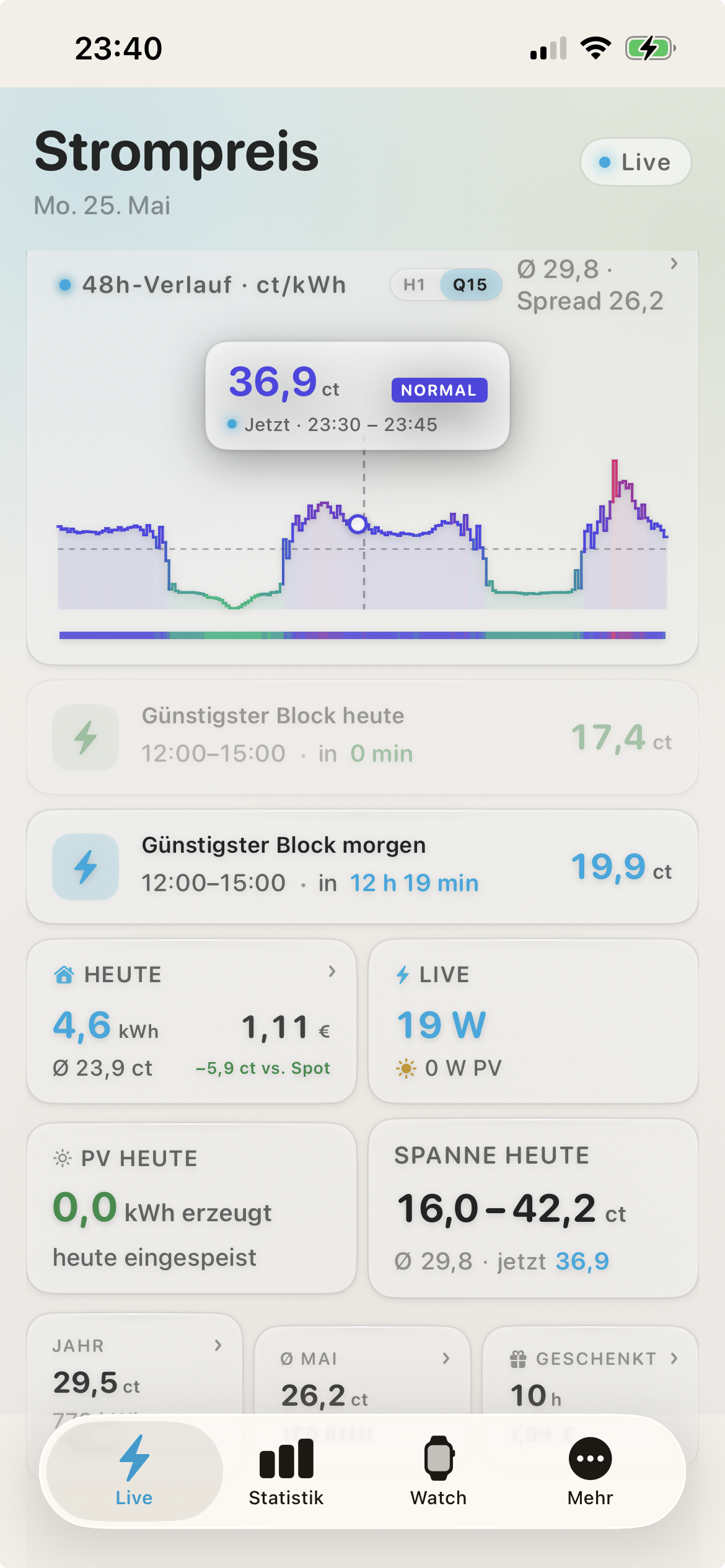
See the cheapest block without opening the app. On the Lock Screen, in the Dynamic Island, in StandBy on your nightstand — wherever you are.

Live Activity during cheap blocks

As soon as the cheapest hour starts, the Live Activity appears on the Lock Screen — with live countdown to block end. On iPhone 14 Pro & newer also in the Dynamic Island.

Lock-Screen & StandBy widgets

Three widget variants on the Lock Screen — price, gauge, cheapest block. In nighttime StandBy mode the price renders extra large, readable from 3 metres away.

48h chart with midnight divider

Full curve across today and tomorrow in one line — with Aurora or Flow style. Switch between 15-min and hourly resolution. Scrub through the day with your finger.

Day comparison with yesterday 7-day consumption band Pattern heatmap by weekday Bill-consistent cost calculation Shortcuts & Siri commands Home-Screen widgets in 3 sizes
Apple Watch

On your wrist. No detours.

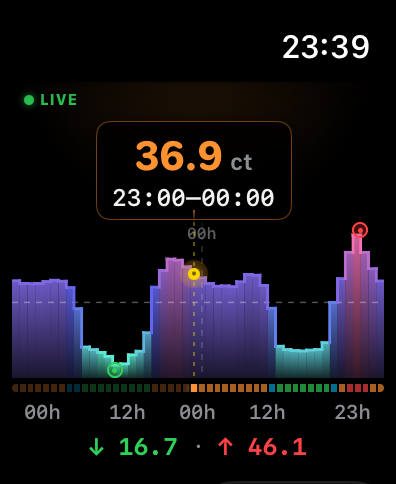
Complication on every watch face. Smart-Stack widget with relevance API. 48-hour forecast with Crown scrubbing and haptic feedback at every hour.

Complications for every watch face

Current electricity price, cheapest hour or live consumption — as corner, edge or circular complication on every watch face.

Smart Stack moves up when it matters

iOS sorts the Smart Stack by relevance — Tibber automatically rises to the top when the cheapest or most expensive hour of the day begins. Powered by Apple's relevance API.

48h chart with haptic hour feedback

Turn the Digital Crown through today and tomorrow — a subtle haptic tick at every full hour. Like a tachometer dial for the electricity price.

15-min & hourly resolution Aurora & Flow chart style Standalone — runs without iPhone Live consumption via Tibber Pulse
Siri & Shortcuts

Just ask. No app needed.

Don't open anything — say it out loud. Siri answers instantly: spoken, and as a glanceable card. Straight from your wrist, your iPhone, your Mac. Hands full at the charger? Perfect.

Hey Siri, what's the electricity price with Current Spot?
Hey Siri, when is electricity cheapest with Current Spot?
Hey Siri, best charging time with Current Spot?
CURRENT SPOT
Charge the car
at02–05
Ø 24 ct/kWh
now 2102–05tomorrow
⚡ Cheapest tonight · save ~38%

Ask, don’t tap

Current price, cheapest hours, the best time to charge the car, today’s consumption — all by voice. Completely hands-free, even with the screen off.

A card, not just a sentence

Siri doesn’t only speak the answer — it shows a price heatmap with the cheapest window highlighted, right in the result. Glance and go.

On every Apple device

Apple Watch, iPhone, iPad and Mac — in five languages. Add any command to the Shortcuts app and chain it with automations.

Current price Cheapest time Best charging time Today’s consumption Daily average Is it cheap now? How long stays cheap Add to Shortcuts
iPad

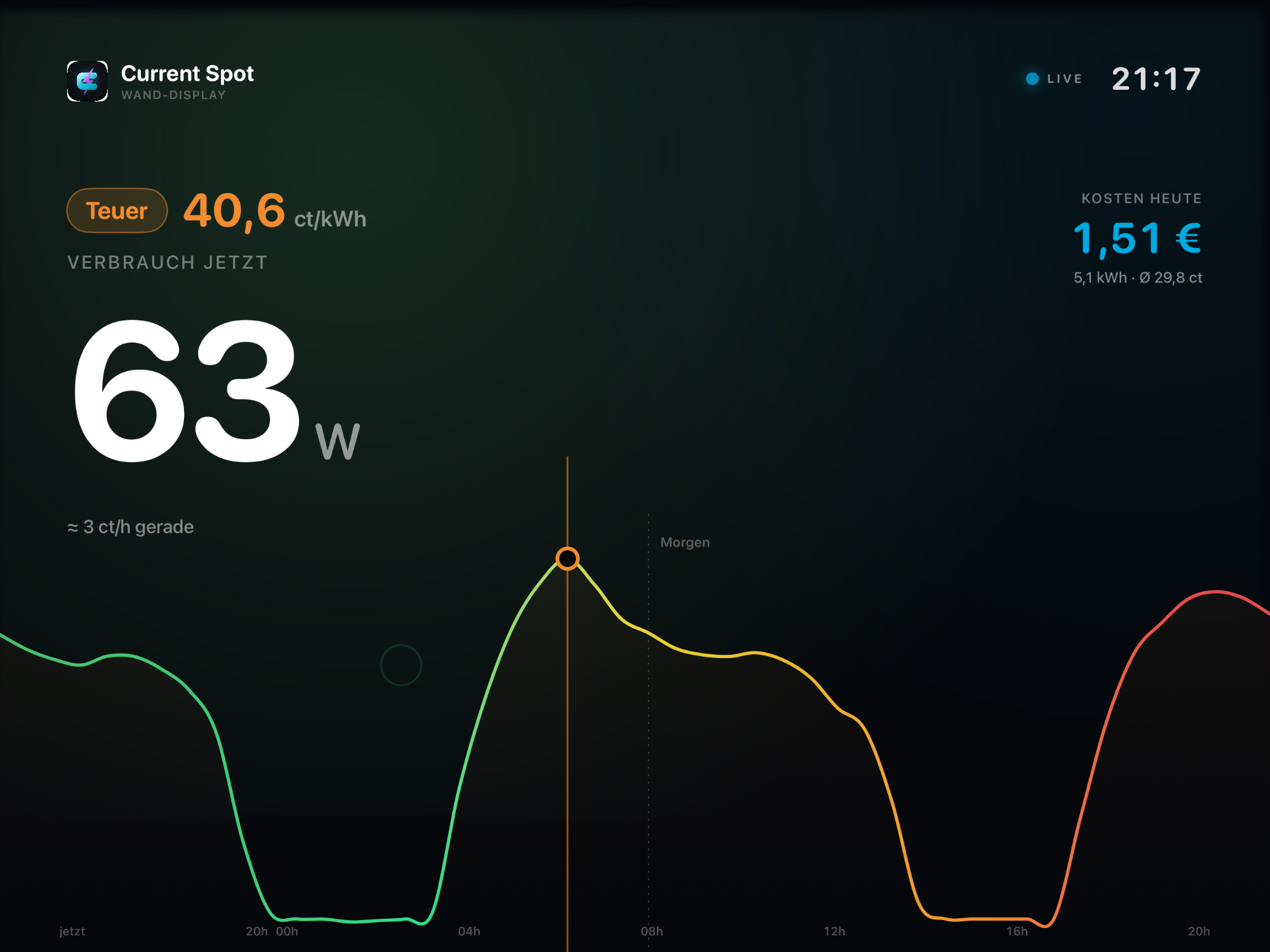
Your energy display for the wall.

Turn the iPad into an always-on electricity dashboard for kitchen or hallway. The traffic-light colour carries the whole wall, live consumption is huge and ticks in real time — readable at a glance from three metres. The only device that keeps the Pulse live around the clock.

Current Spot iPad — wall dashboard with large live consumption, 48h price curve as a landscape and traffic-light colour

Three wall designs to choose from

Horizon shows the 48-hour curve as a coloured landscape — valleys are cheap, peaks expensive. Light Field puts live consumption big in the centre. Instrument uses a price ring like a cockpit. Plus light and dark mode, automatic by time of day or manual.

Ambient mode & Always-On

When no one is standing in front of it, the display dims into a calm ambient mode: deep black, only consumption, price and time. A slow drift of the content protects against burn-in — ideal for 24/7 wall operation.

Hero moment for solar power

When your PV is feeding in and electricity is cheap, the display celebrates the moment: pulsing rings, huge feed-in power and the hint that now is the best time to wash, run the dishwasher or charge.

Live consumption in real time, 24/7 Traffic light: green cheap, red expensive Cheapest block & daily cost Chart style: Landscape, Aurora or Flow Sign in via iCloud Keychain Landscape & portrait
Mac

In your menu bar. Always there, never in the way.

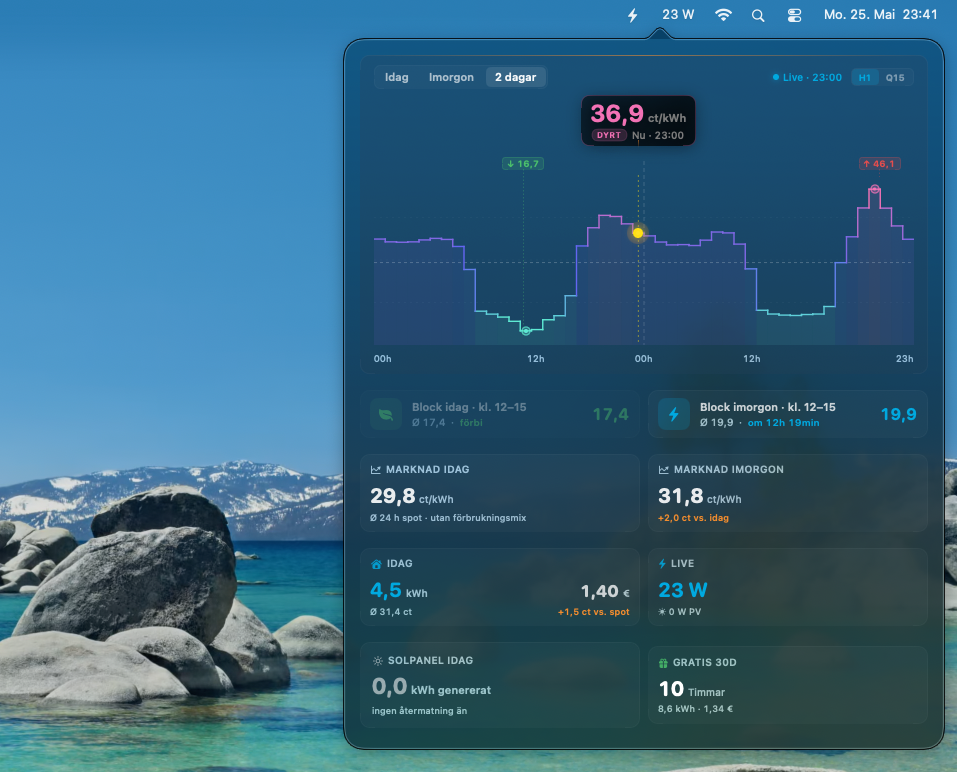
No dock icons, no open windows. Current Spot lives quietly at the top of your macOS menu bar — and on click opens a detailed dashboard with price curve, live consumption and blocks for today and tomorrow.

Live consumption directly in the menu bar

Bolt symbol plus current watt number — visible in every app, anytime. When your heat pump kicks in, you see it instantly. Click opens the full dashboard.

48h chart & block overview

Today, tomorrow or both days combined — as Aurora, Flow or line chart. With cheap blocks colour-highlighted and live cursor on the current hour.

iCloud sync with iPhone & Watch

Enter token once, all devices connected. Via iCloud Keychain — encrypted, no cloud server. Tariff settings sync across platforms.

Native SwiftUI — no Catalyst Light & Dark mode Apple Silicon optimised Notifications at cheap-block start
Privacy

Privacy. Built in, not bolted on.

Your Tibber token, your consumption, your data. They never leave your devices — except on the direct path to Tibber itself.

01

No server between you and Tibber

Your devices talk directly to the official Tibber API. There is no Current Spot server storing or processing your data.

02

Token in the Keychain

Your Tibber token lives in the iCloud Keychain — end-to-end encrypted, protected by Apple's security architecture.

03

No analytics, no tracking

No ads, no third-party SDK, no anonymous "telemetry" packets. You get what you install — nothing else.

Compatibility

Works with your Apple setup.

One account, all devices in sync — via iCloud Keychain.

Apple Watch

  • Apple Watch Series 6 and newer
  • Apple Watch SE (2nd gen)
  • Apple Watch Ultra & Ultra 2
  • watchOS 10 or newer
  • Standalone app, runs without iPhone

iPhone

  • iOS 17 or newer
  • Live Activity from iPhone 14 Pro (Dynamic Island)
  • Lock-Screen widgets from iOS 16
  • StandBy mode from iOS 17
  • Shortcuts & App Intents

iPad

  • iPadOS 17 or newer
  • Wall display, always-on
  • Live consumption via Tibber Pulse
  • Sign in via iCloud Keychain

Mac

  • macOS 14 (Sonoma) or newer
  • Apple Silicon & Intel
  • Native SwiftUI, no Catalyst app
  • Menu-bar app with popover dashboard
  • iCloud sync with iPhone and Watch
Roadmap

Coming soon to your App Store.

Wear OS has been live for months. The Apple versions are now moving from development into TestFlight beta.

Wear OS & Galaxy Watch — available iPhone — TestFlight soon Apple Watch & Mac — to follow

Frequently asked questions

Can I use Current Spot with Siri?
Yes — completely hands-free. Ask things like “Hey Siri, best charging time with Current Spot” on iPhone, Apple Watch, iPad or Mac. Siri speaks the answer and shows a price heatmap card with the cheapest window highlighted. Available in five languages, and every command can be added to the Shortcuts app.
Is there a Tibber app for Apple Watch?
Tibber does not offer an official Apple Watch app. Current Spot is a community-built unofficial Tibber app for Apple Watch — with complications, a Smart-Stack widget and a 48h chart. Works standalone without iPhone too.
When does the TestFlight open?
The iPhone version starts in TestFlight in the coming weeks. Sign up for Early Access and you'll get the link as soon as the beta opens. Apple Watch and Mac versions follow right after.
Does Current Spot work with the Dynamic Island?
Yes. On iPhone 14 Pro and newer the Live Activity appears in the Dynamic Island — as soon as the cheapest hour of the day starts, with live countdown to block end. On all other iPhones it shows as a Lock-Screen banner.
What makes the Smart-Stack widget special?
Apple's relevance API lets us tell the system when the widget is especially relevant. Tibber moves up in the Smart Stack automatically when the cheapest or most expensive hour of the day is about to start — no scrolling needed.
Do I need an Apple Watch or can I use just the iPhone?
Both versions are usable independently. You can run Current Spot on the iPhone only, on the Watch only, or on both plus the Mac — thanks to iCloud sync everything is automatically connected.
How does the Mac version work?
Current Spot Mac is a pure menu-bar app — no dock window, no clutter. At the top of your menu bar you see the current live consumption (watts); click opens a floating dashboard with price curves for today and tomorrow, cheap blocks and consumption.
Which Apple devices are supported?
Apple Watch Series 6 or newer with watchOS 10+, iPhone with iOS 17+, iPad with iPadOS 17+, Mac with macOS 14+ (Apple Silicon and Intel). Live Activity in the Dynamic Island requires iPhone 14 Pro or newer.
How secure is my Tibber token?
Your token is stored in the iCloud Keychain — end-to-end encrypted via Apple's security architecture. There is no Current Spot server processing your data. Your devices talk directly to the official Tibber API.
Is this an official Tibber app?
No. Current Spot is an unofficial, community-built app. It is not affiliated with Tibber AS in any way and is neither endorsed nor officially recognised by them.
Tibber customer with an Apple setup?

Be one of the first when TestFlight opens.

Get Early Access